


WAFF 48 First Alert Weather
4.61.79K Reviews
App Specs
- Version
- 6.2.512
- Updated On
- License
- Free
- Downloads
- 100,000+
- Developer
- Gray Media
- Categories
- Weather
- Platform
- Android
Screenshots
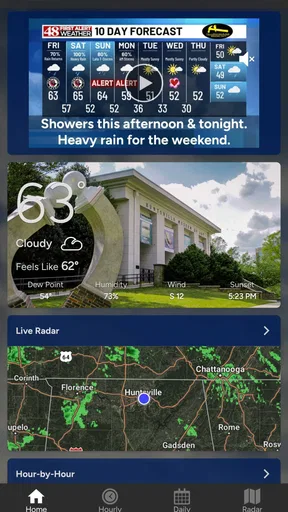
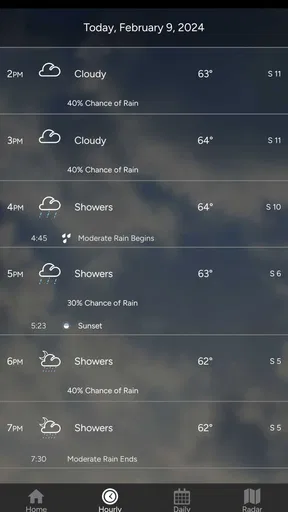
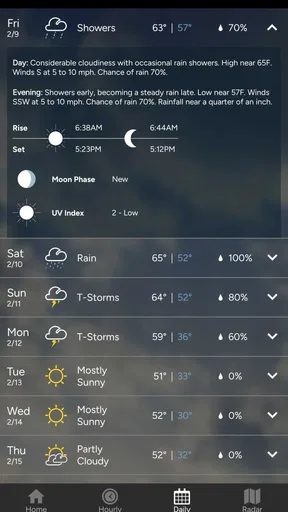
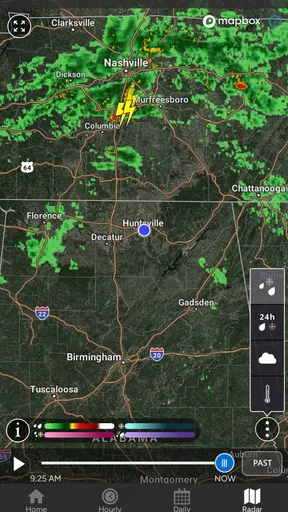
 Analysis by AppCompare
Weather apps are easy to overlook until a forecast affects everyone in the house. I tested WAFF 48 First Alert Weather as a practical weather companion rather than treating it like a simple temperature display. Its strongest role is helping people make everyday decisions together: whether to leave earlier, carry rain gear, change an outdoor plan, or check conditions before children head out. It is a free weather app from Gray Media, and its focus feels more useful for local routine than for people who only want a worldwide weather dashboard.
The app belongs to the weather category and carries an Everyone content rating, which makes it comfortable to consider for a shared household device. It has a 4.6 average from around seven thousand ratings, with roughly 1.8 thousand written reviews, and has passed one hundred thousand installs. Those figures suggest a solid audience, but I still found that its value depends heavily on how closely its local coverage matches where you live and how much detail you expect from a forecast.
Using it when the whole household needs the forecast
A realistic use case is a busy morning when several people are making different plans. One person may be commuting, another may be taking children to school, and someone else may be deciding whether an outdoor errand can wait. Instead of passing around a phone and searching repeatedly, a weather app can become a shared reference point. I found WAFF 48 First Alert Weather most useful in that role when the question was not simply “What is the temperature?” but “What should we change today?”
That distinction matters. A basic weather widget is convenient for a quick glance, while this app is better suited to opening deliberately and reviewing the conditions before making a decision. I would use it before packing a child’s bag, leaving for work, planning a walk, or deciding whether a household chore can be done outside. The app’s local-news identity gives it a more regional feel than a generic global weather service, although that same focus may be less useful if your daily life spans several distant locations.
On a shared tablet or family phone, the main advantage is simplicity. A household member who is not interested in weather terminology can still open the app and get a practical sense of the day. I would not expect it to replace conversation, though. The app can show conditions, but it cannot know whether someone has a flexible schedule, whether a child needs extra travel time, or whether a particular activity can be postponed. The best workflow is to use it as the common starting point, then make the household decision together.
What I would check before leaving
My routine would be to look at the current conditions first, then review the forecast for the period when the household will actually be outside. That avoids a common mistake: dressing for the morning while ignoring the return trip. For school runs, appointments, or work commutes, I would check again before departure if the weather looks unsettled rather than relying on a glance made hours earlier.
A useful habit is to ask one specific question each time: will rain affect the walk, will wind change the driving plan, or will heat make an outdoor activity uncomfortable? This keeps the app from becoming background information that nobody acts on. It also helps when several people share one device, because the person checking the forecast can explain the decision in plain language instead of merely announcing a number.
Worth Reading Before You Choose

EA SPORTS FC Mobile 26 Is a Bigger Football Game, but It Takes Time

Flipboard Shows What News Apps Must Do Beyond the Feed

Switching to Android Auto Means Rethinking Your Driving Routine

Google Calendar Makes a Crowded Week Easier to Manage

Ludo King Makes the Most of the Minutes Between Plans

Baby Panda World Brings Quick Play to Modern Phones, but Its Game Library Feels Busy
I would also avoid treating any weather forecast as a promise. Conditions can change, and a forecast that looks comfortable at breakfast may deserve another look later. WAFF 48 First Alert Weather works well as part of that checking routine, but it should not encourage false certainty, especially when travel or outdoor safety is involved.
Setup boundaries on a shared device
The setup experience is best approached with clear boundaries. Because this is a weather app rather than a household management tool, I would install it on the device that people actually use for planning, not assume it will coordinate everyone automatically. A shared tablet in the kitchen may be ideal for a family that wants a visible forecast, while a personal phone is better for someone who checks conditions while moving around.
There is an important difference between shared access and shared personalization. If several people use the same device, the app may become a common window onto the weather, but that does not mean every person has an individual profile or separate preferences. I would therefore keep expectations modest: use the app to view information, and do not assume that one household member’s arrangement will automatically suit another person.
This boundary is especially useful when adults and children use the same screen. An adult can open the forecast and explain what it means, while a child can look at the conditions without needing a separate account structure. Since the app is rated Everyone, its general audience is broad, but the rating should not be confused with supervision or family controls. It describes the content context, not the way a household should manage device access.
Another practical point is choosing a single routine for checking the app. If one person looks at it in the morning, another checks a different weather source, and a third relies on yesterday’s forecast, the household may end up with conflicting plans. I would agree on a simple approach: use this app for the local outlook, then discuss any unusual conditions before committing to a plan. That is more dependable than expecting the software to solve communication by itself.
Who should control the final decision?
For ordinary plans, anyone in the household can check the forecast. For decisions involving young children, long drives, or difficult conditions, an adult should interpret the information and decide what changes are sensible. The app presents weather information; it does not replace judgment. This is one of the most important setup boundaries because a clear interface can make information feel more authoritative than it really is.
I would also keep notifications and checking habits separate from personal privacy expectations. A weather app can be useful on a common device without becoming a reason to share personal phones or accounts. If a household member prefers not to mix personal use with shared use, installing the app on a neutral family device is a cleaner arrangement than asking everyone to use one person’s phone.
Coordination without pretending the app is a family organizer
WAFF 48 First Alert Weather can support coordination, but its role is narrow and practical. It helps the household agree on what the conditions look like. It does not turn that information into a shared calendar, assign responsibilities, or confirm that everyone received the same message. I see that limitation as manageable as long as nobody expects a weather app to become a family communication system.
A good workflow is to check the forecast, identify the affected person, and state the action clearly. For example, instead of saying “It may rain,” I would say, “Let’s take umbrellas because the walk home is later.” That small change turns weather information into useful coordination. It is particularly helpful when a child or older relative is involved, because the practical instruction is easier to follow than a vague forecast discussion.
For shared errands, I would use the app before leaving and again if the outing is long. One person can check the conditions while another handles bags, transport, or timing. This is a subtle strength of having a local weather app available on a common device: the forecast becomes part of the planning conversation instead of being locked inside one person’s phone.
The trade-off is that coordination still depends on people remembering to communicate. If you need automatic location sharing, multiple personalized alerts, or a detailed household dashboard, a broader weather platform may suit you better. WAFF 48 First Alert Weather is more focused. I would choose it when the household wants a straightforward local check, not when it needs a full system for managing several people’s schedules.
Comparing it with the usual alternatives
Compared with the built-in weather app on a phone, this app feels like a more deliberate local destination. A built-in app usually wins for speed because it is already integrated into the device and often appears as a widget. WAFF 48 First Alert Weather makes more sense when you want to open a dedicated app and review the local outlook as part of a routine.
Compared with large national or global weather services, its regional identity is the main point of difference. Those alternatives may be preferable for people who travel often, monitor several cities, or want a very broad set of map and data tools. I would lean toward WAFF 48 First Alert Weather for someone whose daily decisions are tied to the area it serves and who values a local-news-oriented weather experience.
Compared with a television forecast or a general news app, the dedicated format is more convenient when you need to check conditions at an exact moment. You do not have to wait for a broadcast segment or search through unrelated headlines. The compromise is that an app should not be treated as a substitute for broader local awareness during unusual events. If conditions are serious, I would cross-check official local guidance rather than relying on one weather screen.
For a household, the choice comes down to scope. A simple built-in widget is better for instant temperature checks. A large weather service is better for travel and multiple locations. This app sits between those options: more intentional than a widget, but not something I would select solely for complex multi-location planning.
Age, trust, and responsible use
The Everyone rating makes the app approachable across age groups, and I can see it working well on a family device where adults and children occasionally check the forecast together. Still, younger users may need help understanding the difference between current conditions and a prediction. A child might see a sun icon and assume an outdoor plan is guaranteed, while an adult is more likely to consider timing, clothing, and changing conditions.
That makes the app a useful teaching tool when used together. I would show a child how to compare the current weather with the later forecast, then connect it to a concrete choice such as wearing a light jacket or bringing rain protection. The lesson is not about memorizing weather symbols; it is about using information carefully and revisiting it when plans change.
Trust should also be practical rather than absolute. The app is from Gray Media and has been available since February 2011, which gives it a long presence in the mobile weather space. Its current version is 6.2.512, and it supports operating systems starting with version 9. That makes it relevant for many older compatible devices, though I would still check the device’s software before planning to use it on an aging shared tablet.
Those details matter in a household because a family device may not be the newest one. If the app installs and runs properly, it can give an older phone or tablet a useful purpose. If the device is below the minimum operating system requirement, however, it is not a good candidate for the shared weather station. In that case, the built-in weather option or a compatible alternative may be more practical.
Because the app is free, trying it does not require a purchase decision, which is helpful when a family is comparing it with other weather tools. Free access also makes it easy to place on a communal device without asking every household member to pay. I would still judge it by usefulness rather than price: a free app that does not match your location or planning habits is not automatically the right choice.
Small habits that make the app more useful
One non-obvious benefit of a dedicated weather app is that it can create a consistent household checkpoint. Instead of everyone checking at random, choose moments tied to real decisions: before school, before commuting, and before an evening activity. This reduces the chance that someone plans around an outdated glance and gives the family a shared language for discussing the day.
A second useful habit is to separate “comfort” from “risk.” Temperature may tell you whether a jacket is pleasant, but it does not answer every question about driving, walking, or outdoor exposure. I would use the app to begin the discussion, then consider timing and the needs of the least flexible person in the group. That approach is more valuable than focusing on a single headline condition.
A third trade-off is deciding where the app belongs. On a personal phone, it is convenient for individual checks. On a kitchen tablet, it becomes easier for everyone to see but less useful when someone is already away from home. I would not install it everywhere automatically. One well-placed shared device can be enough for a household routine, while a frequent traveler may need a different tool on a personal phone.
Finally, I would keep a backup habit for important plans. If a trip, appointment, or outdoor event depends heavily on weather, check the app close to departure and use common sense about changing conditions. This is not a criticism unique to this app; it is simply the responsible way to use forecast information. The strongest weather workflow combines a convenient app with human judgment.
My household verdict
I recommend WAFF 48 First Alert Weather for households that want a free, approachable way to check local weather together, especially when the app’s regional focus matches where they live. I like it most as a shared decision-making aid: something to open before school runs, commutes, errands, and outdoor plans. Its Everyone rating and modest device requirement also make it a reasonable choice for a common family phone or tablet.
I would skip it if your main need is worldwide travel planning, a complex multi-location setup, or a complete family coordination system. In those situations, a larger weather service or a combination of built-in tools may be more suitable. I would also avoid treating its forecast as a guarantee or assuming that a shared device creates separate personal experiences for every user.
For the right household, though, its simplicity is a strength. It gives people a common place to start, encourages timely checks, and avoids the clutter of a general-purpose app when all you need is weather. My final view is positive but specific: choose it when local, everyday planning matters more than advanced travel features, and make the most of it by turning forecast checks into clear conversations and sensible decisions.
Pros
- Accurate local forecasts for the Western New York area.
- Live radar helps track rain
- snow
- and severe weather.
- Push alerts provide timely warnings for dangerous conditions.
- Hourly and extended forecasts are easy to check quickly.
- Video updates add useful context beyond standard forecast data.
Cons
- Coverage is mainly focused on Western New York viewers.
- Frequent alerts may feel excessive during active weather periods.
- Some features require location access to work properly.
- Forecast details can vary in accuracy during rapidly changing weather.
- The app may use more battery when location and alerts stay enabled.
FAQs for WAFF 48 First Alert Weather
What is WAFF 48 First Alert Weather?
WAFF 48 First Alert Weather is the official weather app from WAFF 48, serving Huntsville, North Alabama, and surrounding areas. It provides current conditions, hourly and extended forecasts, interactive radar, weather alerts, and local updates. The app is especially useful for monitoring changing conditions, severe storms, tornado threats, heavy rain, and other weather events in the Tennessee Valley.
Does the WAFF 48 First Alert Weather app provide severe weather alerts?
Yes, the app is designed to deliver important weather warnings and notifications, including alerts for severe thunderstorms, tornadoes, flash flooding, winter weather, and other hazardous conditions. After installing the app, you should allow notifications and location access if you want localized warnings. Alert availability and timing can depend on your selected location, device settings, and official warning data.
What features are included in WAFF 48 First Alert Weather?
The app typically includes an interactive weather radar, current temperature and conditions, hourly forecasts, seven-day outlooks, video forecasts, weather news, and location-based updates. Users can often save multiple locations, view radar layers, and receive notifications for significant weather. The exact features and layout may change as WAFF updates the application or modifies its weather services.
Does WAFF 48 First Alert Weather use my location?
The app can use your device location to show weather conditions and alerts for where you are, which is useful when traveling or when severe weather develops nearby. Location access is generally optional, because you may manually search for and save cities instead. If privacy is important to you, review the app’s permission requests and choose whether location access should be allowed all the time or only while using the app.
Is WAFF 48 First Alert Weather free to download?
WAFF 48 First Alert Weather is generally available as a free download for compatible Android and iOS devices. The app may be supported by advertising, and mobile data usage can occur when loading radar maps, videos, forecasts, or alerts. Before downloading, check the current Google Play Store or Apple App Store listing for device compatibility, updated privacy information, regional availability, and any changes to the app’s terms.


